WebHostingBuzz Blog Hosting, hosting, more hosting and a little of everything else

All posts in New Products & Services

Dual Xeon E5 Servers

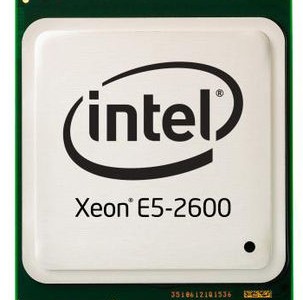
We’ve been busy enhancing our dedicated server range both sides of the Atlantic. Launching this week is our new Dallas, TX based range of 2x CPU Intel Xeon E5-2620 series servers! These powerhouse servers each come with 2 of the latest Intel E5 CPU offering 12 physical cores (24 with HT) of pure processing power. It doesn’t get faster than this!

Intel Xeon E5 CPU

Intel Xeon E5 CPU

The full configurations we are offering are:

Dual Intel E5-2620 SATA

  • 2 x Intel E5-2620 CPUs – 12 x 2.0Ghz with 15MB Cache
  • 32 GB DDR3 ECC RAM
  • 2 x 1000GB SATA Hard Drives
  • 10,000GB Bandwidth
  • $439 per month with free setup


Dual Intel E5-2620 SSD

  • 2 x Intel E5-2620 CPUs – 12 x 2.0Ghz with 15MB Cache
  • 64 GB DDR3 ECC RAM
  • 2 x 256GB SSD Samsung 840 Pro Hard Drives
  • 10,000GB Bandwidth
  • $539 per month with free setup

These will be appearing on our dedicated server page shortly. In the mean-time, please contact sales@webhostingbuzz.com to order. Stocks are limited so act now. P.s. do check our prices against our competitors and see just how competitive these servers are!

Share

Ultrabooks are coming

Just when you thought you had the mobile computer market figured out, another category is about to appear. Laptops, netbooks, and tablets will soon be joined by the newest type of mobile computer: ultrabooks.

Intel trademarked the term “ultrabook”, is setting guidelines and optimizing its processors for the devices. Initially, Sandy Bridge processors will be used, but faster, more efficient processors will appear when the new Ivy Bridge architecture is ready later this year.

First and foremost, ultrabooks will thin and light laptops with quick resume from standby. Unlike netbooks, ultrabooks will include powerful processors such as i7 dual-core models, and be capable of running the latest Windows operating system and Windows applications. This could make them true lightweight alternatives to a desktop replacement laptop, as opposed to netbooks which come with many power and application compromises.

Key to long-term market success, according to Intel, is that ultrabooks will be affordable. They are planned to initially sell for less than $1000, with prices dropping quickly as volume increases.

“We’re lowering the price,” says Intel executive vice president Sean Maloney, “not so much immediately, but over time.” Part of the ultrabook concept is getting really thin, really responsive systems down into the mainstream, he says. When they cost $1,000 or more, they’re relegated to 10% of the notebook market.

“If we do it right, the PC Ultrabook will be 40% of the notebook market in about 18 months,” says Maloney. “We did this before in 2008 and we screwed it up: we didn’t cut the price. Now, we’ll cut the price, thanks to volume and scale.”

Ultrabooks will combine the performance of a laptop with “tablet-like features” in a “thin, light and elegant design,” says Maloney.

The first announced is the Asus UX21 Ultrabook. Expected to be available in September, it is 17mm (0.67 inches) at its thickest point and uses a Core i7 processor. Rumoured possibly to beat that launch date are ultrabooks from HP, but HP has yet to confirm that.

I had thought that tablets would eat significantly into the netbook market. Ultrabooks, if they turn out to be as good as they sound, could revitalize the lightweight portable computer market and offer a strong alternative to tablets. People who want portable e-readers, music players and other such apps may choose tablets. Those of us wanting more of a portable desktop alternative, with a proper keyboard and able to run all normal Windows apps, may prefer an ultrabook.

Share

Taking my music player on the road

I have plenty of good music on my iPod, and I have a decent car stereo. I had been seeking a way to combine the two. While many new cars include a port for connecting a music player, my 16-year-old car has no such feature.

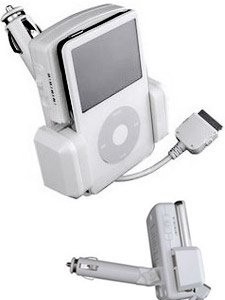
I’m very pleased with my choice of the Digipower iPod Navigator. It was a low-risk choice, as I paid about CAD $15 (11 Euro) for mine when on sale (special offer).

The unit plugs into the car’s 12-volt power receptacle, which in my car’s case is the cigarette lighter. It securely holds and charges the music player, and transmits the music to the car’s FM radio. The padded sides of the holder adjust to fit larger music players and narrow ones such as my iPod Nano.

This model has four preset FM frequencies. The idea is to pick the one that has the least amount of signal intruding on it from local radio stations. Other than occasional low-level interference when in highly congested radio areas such as a major city, this gizmo works very well.

One consumer reviewer said he had used several much more expensive Belkin and Monster brand transmitters, but they “all broke during cold Canadian weather use”. I’ve left this one in the car during bitterly cold Canadian winter weather without any problem.

It’s great to have my iPod playing through my car stereo. The fact that it’s an inexpensive brand that does the job is music to my wallet.

Share

Solar powered notebook netbook

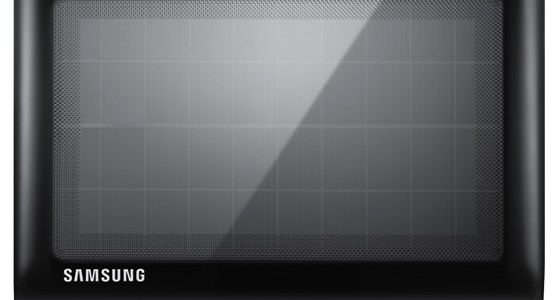
Samsung is about to launch the NC215S solar-powered netbook this August. Samsung claims it’s the world’s first portable cocmputer with a solar panel integrated into the lid.

The NC215S netbook will be released first in Russia. The 1.3 kg. (2.8 lb.) unit includes a 10.1″, 1024 x 600-pixel display, Intel Atom N570 1.66 GHz dual-core processor, 1GB of Ram and a 250GB or 320GB drive.

The solar panel is not intended as the primary energy source, but to extend battery life up a possible 14.5 hours. Sounds like the perfect tool for a long stretch of research and writing on a cafe patio.

Share

Kinect gaming system helps Toronto surgeons

Surgeons at Sunnybrook hospital in Toronto, Canada, are using video game technology as an aid in surgery.

Using Microsoft’s Xbox platform and the hands-free Kinect controller, surgeons access medical images such as X-rays, MRIs and CT scans, without having to touch anything. Not only can many images be quickly accessed, but surgeons no longer need to touch a keyboard or mouse which always added some risk to sterility.

“What this was able to do is take away that last barrier and remove the mouse, remove the interface… and now I just give it hand signs”, said Dr. Calvin Law, a surgical oncologist. “We’re able to control the computer without actually touching anything.”

“You’re always concerned to a degree that every time you move away from the operating table, every time you have to go to another area, you always put your sterility at risk a little bit,” Law says. “There’s nothing like minimizing the risk to absolutely as low as possible.”

Previously, when using a conventional mouse and keyboard, a surgical team member had to scrub out to access the computer images, then scrub in again to return to the surgery. This could add as mush as two hours to a long operation. This time is now saved with the hands-free Kinect system.

The system was created by a first-year surgical resident who is also an electrical engineer, an engineering friend, and a computer engineer. The Kinect camera sensors capture movements and gestures, and two computers and some custom hardware recognize the user and translate gestures into image access commands.

Share

Radio streaming to your mobile device

I’m a big fan of Internet radio and streaming music. While I have a large music collection on vinyl, CD and digital, I like the serendipity of not knowing what will play next. Listening to such streams, I’ve often discovered artists I now love who I might not otherwise have encountered.

TuneIn Radio Pro lets you take streaming radio with you. Designed for mobile devices, it runs on Apple iPad and iPhone, Android, Palm, Blackberry, Windows Phone, and Samsung Bada, as well as some home media players.

With the Pro version, you can listen to and record over 50,000 FM & AM radio stations, and Internet-only stations. A broadcast can be paused up to 30 minutes, fast forwarded or rewound, and can be recorded for later listening.

You can search for your hometown radio station. Searching for an artist or song finds radio stations playing that song right now. Favourite stations can be saved as presets, which can be synched across your devices.

The fact that TuneIn streams live radio means that you can listen to live sports broadcasts or other live events. I know a few hockey and baseball addicts who would use this.

For the bargain price of 99 cents, this is a full-featured application.

Share

Life in the cloud?

By now you’ve heard about Apple’s announcement of iCloud. This week’s media launch from Apple showcased that new service (with the stupid name of “iCloud”) plus some lesser ones. I think the best news from that event was that Steve Jobs was part of the presentation. Whatever the extent of his health issues, it’s good to see that he’s still involved.

The new service will scan your PC’s music collection and then make the same music available from Apple’s servers. The idea is to make your music accessible remotely from any connected device. There are questions, though, as a lot of detail has yet to be communicated.

For example, how will Apple match music? Will it be simply based on artist and song? What about cases where the artist has recorded many different renditions of a particular song, which is common in jazz. What about the particular album release? I spend time seeking out the better sounding releases, so that I may prefer the 1988 CD of an album rather than its recent harsh sounding remastered version. Which one will Apple provide?: presumably the recent one, as it’s what would be currently available from the record company.

Will the source of the music tracks matter? Surely any tracks originally purchased from Apple’s iTunes will be matched, but what of other sources? I have many digital tracks that I copied myself from my CDs. Will Apple provide those from its cloud? What of tracks that were downloaded illegitimately, from pirate sources? Will Apple match those, or try to find a way to screen them out? This is a tough one, because if they filter out those, then they’ll probably not allow the albums that I copied from my CDs.

Beyond music, Apple plans to scan and upload your photos, word processing documents, and other files from your computer. Given the increasing frequency of security breaches on major servers, do you want your entire digital life sitting on Apple’s servers? I’m not sure that I do.

Share

Dell launches thin-and-light laptop

As rumours predicted, Dell today launched its new think laptop. At less than one inch thick and 2.51 kg (5.54 lbs), this is a sleek machine. Its streamlined, brushed aluminum look and popular chiclet (island-style) keyboard are causing comparisons to the Macbook Pro. But in many areas, this Dell has better specs.

Along with Intel Core i5 and Core i7 Sandy Bridge processors, the new XPS 15z is available with a 1080p screen, a higher resolution and, according to PC Magazine, a better display than the screen in the Macbook Pro. The 7200 RPM hard drive is also faster than the 5400 RPM in the Macbook.

In spite of comparisons, I don’t see this a direct competitor to the Macbook, particularly as the Dell is priced much lower than the Macbook. PC Magazine awarded Dell’s new XPS 15z their Editors’ Choice for desktop replacement laptops.

Compared to Apple’s media darling status, Dell is often the Rodney Dangerfield of laptop makers: it gets no respect. Known more for its value priced Inspiron range, in the last few years Dell has released excellent desktop replacement laptops with great specs, good looks and aggressive pricing. Add that to Dell’s good customer support, and Dell’s products are well worth a look.

Share

Dell ultra-thin laptop coming tomorrow?

Rumours are all over the Internet today about an impending release of a new ultra-thin laptop from Dell. Even Dell is being coy, with Michael Dell tweeting that something is “coming soon”.

What’s anticipated is the thinnest 15-inch laptop in the market, the 15.6-inch model XPS 15z. Unlike Dell’s earlier thin and light Vostro, which was somewhat underpowered, this new one has oomph. It is supposed to use Intel Core i5 and Core i7 Sandy Bridge processors, which would make it competitive for processing power with even heavier models.

The elegant new laptop is also rumoured to be coming out at a price less than $1000, which would make it very appealing. As I have been considering buying a Dell XPS 15″, which has great specs and looks good, this new ultra thin model, if it appears this week, would make me reconsider.

Share

Printing without a printer

Sometimes you need to print a document without being connected to a printer. This process is often referred to as using a virtual printer. There are many scenarios when this would be necessary:

  • You’ve completed a document and spent time making small adjustments to printing options until it looks perfect in the Print Preview. You don’t want to go through all that again once connected to a printer, so you want to print it now to save that state.
  • You plan to e-mail a document to someone to print it, and you want to know exactly how it will look. You don’t want that recipient to have to adjust printer options or mess up your settings.
  • You want to send a document to someone who does not have the software required to view it.
  • You’re using an application that lacks a Print Preview command. You want adjust things to get the print output perfect before wasting any paper.

For all those situations, the solution is to use a virtual printer.

I used to print to file, which creates a .prn file. That .prn file can then be printed by using a free utility that interprets .prn files. That worked well, but required the printer-connected computer to run the free prn utility. For an infrequent recipient, that may not be convenient.

I now use PrimoPDF, which prints to a PDF file. Once installed, from within any application choose the regular Print command and then from list of available printers select PrimoPDF. It’s that easy.

There is a surprising number of options for this free utility. For example, when printing there are five quality profiles:

  1. Screen – smallest files, images suitable for on-screen viewing
  2. Print – larger files, photos retain high quality for printing.
  3. eBook – medium files for web and office, with compressed images.
  4. Prepress – largest files, preserving source image quality if possible.
  5. Custom – allows individual selection of options for colour, PDF version, resolution and more.

You can specify what document properties PrimoPDF writes to the metadata of the pdf file, and password protect the file.

There are other virtual printer utilities, but I can recommend PrimoPDF. It works well for me.

Share